
How to use the Echobox transactional email API
Sending a transactional email with an Echobox template
Using the transactional email API
Overview
You can use the Echobox transactional email API to send notification-style emails such as a password reset or an account verification email.
The Echobox transactional email API is currently an opt-in feature. Please reach out to your Customer Success Manager to get set up.
Sending a transactional email with an Echobox template
You can send transactional emails with templates configured in Echobox.
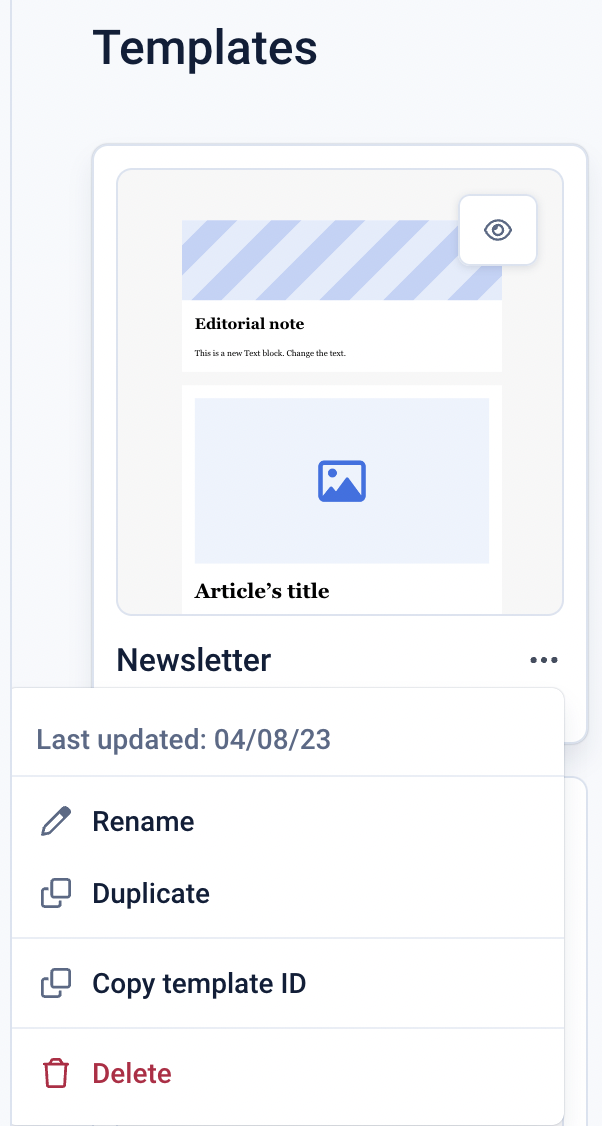
To retrieve the template URN, navigate to the templates area in Echobox by:
- Clicking the dropdown arrow next to ‘Create’
- Click ‘From template’
- Click the 3-dot menu on a template
- Click ‘Copy template ID’
You can include dynamic data in the email body and the subject line that can be populated by data sent in the request in the “to” array object.
To do so, include variables in your template that will be populated with the data in the request, for example:
Tables can't be imported directly. Please insert an image of your table which can be found here.
The variable names must match.
Using the transactional email API
Please refer to our API documentation to understand how to send requests to the transactional email API.
https://docs.echobox.com/reference/endpoints-transactional-emails