
The Archive
What is it?
The Archive shows all of the articles published on your content feed(s). It provides you with a convenient way to view all of your historical articles, and reclassify and/or reshare them.
How do I use it?
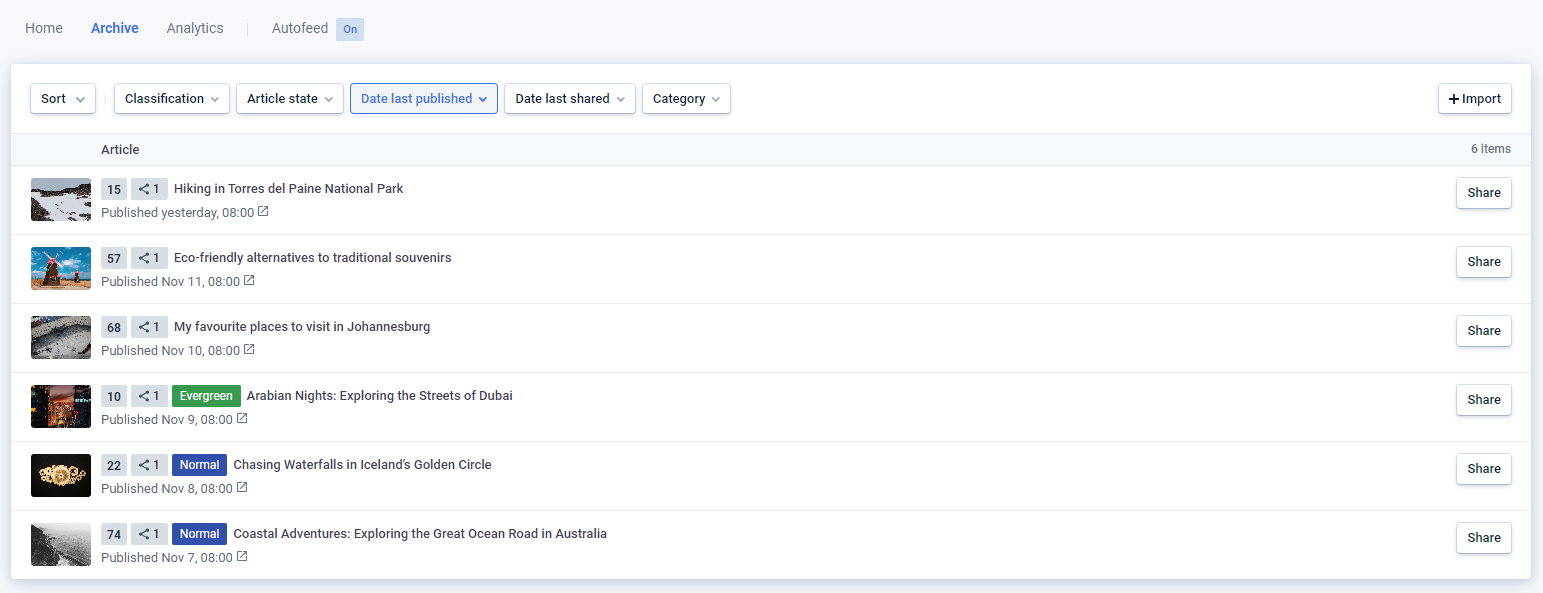
By default, the archive shows all articles published in the last week ordered by date, but you can use the available options at the top of the screen to sort and filter results.
Sort
Choose to sort articles by their last published date (i.e. the most recent date they appeared in one of your content feeds), last shared date (i.e. the date they were most recently shared from Echobox), or score.
Classification
Choose to show articles with any combination of Evergreen, Normal, Breaking and Unclassified timing options. Echobox will automatically analyze the content of all published articles to determine a suitable classification, but as you’ll see later it’s possible to manually override these classifications.
Article state
Choose to show articles that have (or have not) been shared from Echobox, or have been reshared from Echobox, or any combination of these.
Date last published
Choose a time period from which to show articles based on their last published date (i.e. the most recent date they appeared in one of your content feeds).
Date last shared
Choose a time period from which to show articles based on their last shared date (i.e. the date they were most recently shared from Echobox).
Category
Show articles that contain one or more categories or topics. These categories are taken from the category tags within an RSS feed.
Actions
Hover over any article in the archive to reveal the following possible actions:

Clicking on one of the timing options (Breaking, Normal or Evergreen) will classify (or reclassify) the article. This not only helps to train Echobox to classify future articles more accurately, but it also ensures that you’ll be able to filter articles more accurately on your next visit to the archive.
Import
If you’re new to Echobox, you might want to import all of your past Evergreen content to be able to reshare it. Please contact our support team for further information via the link shown when you click Import.