
Preparing to connect your Instagram account to Echobox
To connect an Instagram account to Echobox, you will need:
- An Instagram Business account
- A Facebook business page with admin access
- To connect the Instagram account and the Facebook page
How to make your Instagram account a business account
Please follow the instructions from Instagram here
How to connect your Instagram account to your Facebook page
Method 1: Use Facebook on desktop (recommended)
- Log into Facebook
- Switch from your personal account to your business page via the profile photo
- Click again on the profile photo and from the drop down menu select Settings & privacy
- From the next menu select Settings
- On the settings screen, from the left-hand-side menu select Linked accounts
- Select Instagram and click Connect account
- Facebook will suggest an Instagram account or accounts to be connect - please select the account you wish to link and click Connect
- You may now need to enter your Instagram login information
- Done!
Please find a video walkthrough here:
You can confirm this has worked by logging into Meta Business Manager - if you see two profile pictures like this, you have successfully linked your pages.
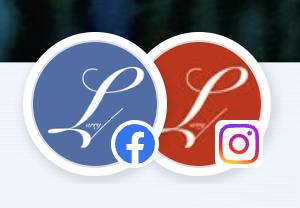
Sometimes Meta asks for further confirmation, and you'll see an alert at the top of your Meta Business Suite. In this scenario, repeat the page linking steps above and confirm the additional permissions when required.
Method 2: Use Instagram on mobile
- Open the Instagram app on your phone - you should already have made your account a business account
- Go to your profile and click on the hamburger menu top right of the screen
- On this menu, select Settings, then Business, then Connect a Facebook Page
- From the popup, choose Connect existing Page
- From the list of your Facebook pages, choose the page you wish to connect
- Done!