
Installing the Echobox Web Tag
Echobox gains powerful insights from your pageviews so that we can help you maximize your performance. The Echobox Web Tag is a Javascript snippet that you install on your website. Once installed, it will send anonymized pageviews to Echobox in real-time so that Echobox can understand your audience and optimize its decision-making.
What data does Echobox track?
The Echobox Web Tag only captures the page URL, the previously loaded page (the referrer), and the associated timezone each time a web page is loaded.
We have specifically chosen to track in this way to ensure that we are not capturing any personally identifiable information about any visitor, as this data is not required for Echobox to be effective.
Data Privacy
The Echobox Web Tag has been designed and built with privacy at the forefront. We don’t capture any personal information about the visitor, only the fact that a page has been loaded, the URL of the previously loaded page (the referrer), and the associated time zone. This data doesn’t include any personal information about your visitors.
You may have seen other web analytics tools that discuss GDPR in more detail. This is because those tools are performing some type of user tracking (most often IP address or cookie tracking) to calculate other metrics, like user sessions and unique views. Echobox does not require these metrics and does not capture any personally identifiable information. This means that we are GDPR compliant.
How to install the Echobox Web Tag
Manual Installation
Before starting: You need to be able to edit your own site or involve your website administrator to install the snippet.
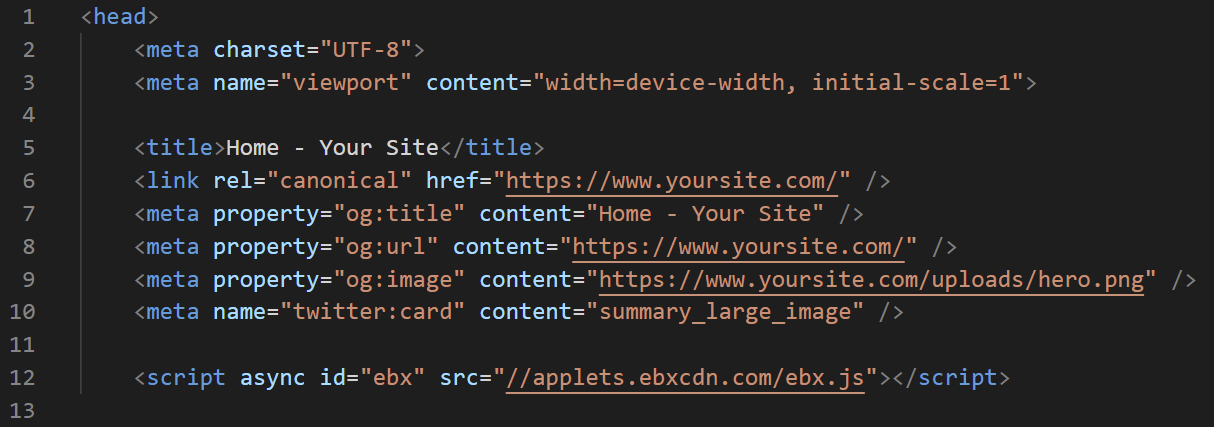
- You can access the Echobox snippet during the setup process or in your settings. In your settings, the snippet can be viewed under Settings > Property Settings > Web Tag.
- Copy that snippet and insert it in the header of your website. For the Echobox Web Tag to accurately determine your page views, the snippet will need to appear on every page of your website.
- Make sure the code is contained between the <head> (the opening tag) and the </head> (the closing tag). For data accuracy reasons we recommend installing the web tag directly if possible, rather than using a tag manager. If you do use a tag manager please let Echobox support know.
WordPress
If you are using WordPress to host your website, some additional steps are required.
- Log into your WordPress dashboard and go to Appearance > Editor on the left navigation menu.
- From the list of templates on the right side, click on the header.php file. If you can’t find the file, press Ctrl+F and search for header.php
- Inside the header.php file, look for the tag. Copy your analytics tracking code and paste it just above the tag.
- Click on the update file button.
FAQs
Technical Questions
Can this Web Tag slow down my website?
No. The Echobox Web Tag operates ‘asynchronously’ which means it does not block any actions happening on your website. Your users will see no change to your load times.
Can I still use other web tracking solutions if I want to?
Yes. The Echobox Web Tag works asynchronously and has no impact on any other analytics tools or extensions on your website.
Can I use a tag or asset manager to install the Web Tag?
All components of the Echobox Web Tag are fully cached via Cloudflare, and we monitor performance closely, so any additional caching can introduce unexpected side effects. Tag and asset managers are also more likely to be blocked on users' browsers. Due to this, we recommend installing the web tag directly where possible. Tag and asset managers are supported if needed but please let Echobox support know.
Data & Privacy Questions
Does the script process personal data?
No - we don't capture any personally identifiable information (PII). The Web Tag complies with data privacy regulations like GDPR or CCPA.
Is any collected data processed outside the European Union?
No. All of Echobox's servers are located within the EU.
Does the script install any cookies?
No. Tracking user behavior across pages isn’t necessary for Echobox so we do not use any cookies at all.
How do you capture the referral source for a pageview?
We use the external referrer and utm_source to determine the referral source. No user tracking is used for this.
Are Google Analytics 3 or Google Analytics 4 GDPR compliant?
No. Several European courts have found Google Analytics to not be GDPR compliant (Austria, Denmark, France, Italy, Norway)
This is true for Universal Analytics (GA3) and Google Analytics 4. Google collects personal data and processes it outside the EU, and is subject to US data surveillance laws such as FISA and the Cloud Act.
According to Denmark’s Data Protection Agency:
"For Google Analytics 4, it is apparent from Google’s documentation that IP addresses are used to determine the approximate location of the visitor, after which the address is discarded before the data is logged to a server. As with Universal Analytics, the same issue is also relevant for Google Analytics 4, as – depending on the location of the data subject – there can be direct connection to, among others, American servers before the address is discarded."