
Content Feeds
What are RSS feeds and how does Echobox use them?
RSS feeds are a ledger of the latest content published on your website. You will need to connect your RSS feed (or a sitemap) to your Echobox. This will allow us to analyze your content and share the best articles at the best times.
Within your Echobox, you can connect different RSS feeds to different social media pages to ensure that only relevant and specific articles are considered for a particular page. Echobox reads the connected RSS feeds every 60 seconds to search for new content. Once an article has been seen on the RSS feed, it will remain in your Echobox, even if it disappears from the RSS feed.
The fields Echobox can read for an article on an RSS feed are: RSS Image, RSS Description, RSS Title, and pubDate.
RSS feeds vs. sitemaps
Echobox can support both RSS feed or sitemaps. Here are some differences:
- RSS feed: usually only contains around 10 articles (ADVANTAGE)
- Sitemap: usually contains many thousand articles (DISADVANTAGE)
Echobox only reads the first 3000 articles on a sitemap. Only articles added after the sitemap has been connected to Echobox will show in the Home Feed. While sitemaps can have a title, image and publish field, they commonly don't, and so we normally don't get to use any of the RSS data sources. Sitemaps cannot have a description field.
For these reasons, we recommend RSS feeds over sitemaps. However, there are many clients who use Echobox with sitemaps and do not experience any issues at all.
How to set up your own RSS feed
Every social account connected to Echobox Social needs at least one RSS feed or sitemap associated with it. In order to check if your RSS feed is valid, you can use a validator: https://validator.w3.org/feed/
If the feed doesn't validate, please try to fix the problem in the feed source code.
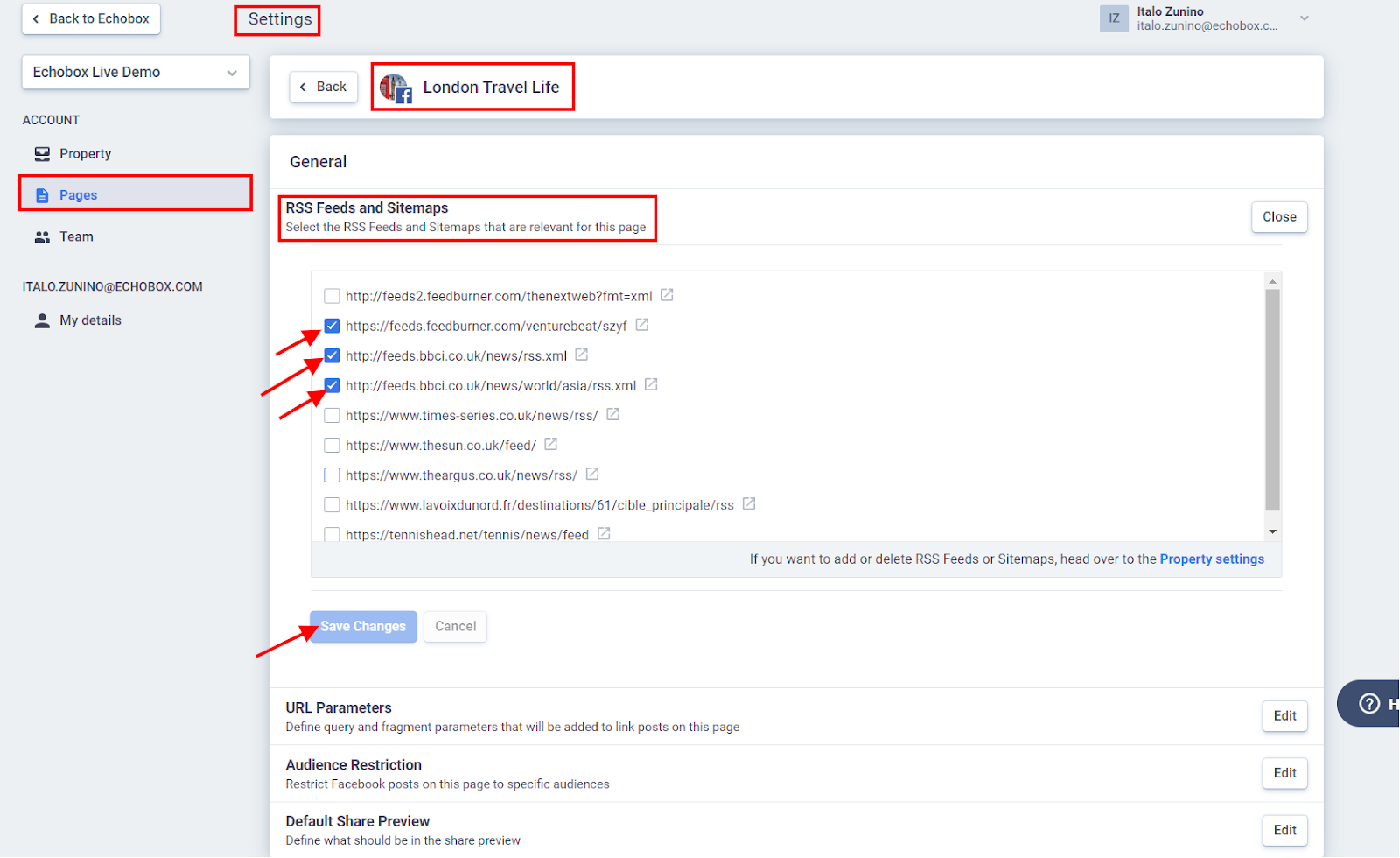
When you add a new feed to Echobox in the Property settings, you must also add that feed to any social pages you want it to be used for. This must be done in the Pages settings (https://secure.echobox.com/settings/pages).
RSS tags vs. OG tags
When sharing to social media, various platforms use different semantic tag protocols to extract article meta content such as title, description, images etc. Echobox uses this information as part of its algorithms and to help prepopulate share information, saving you time. RSS tags are one of the options you can use to compose your posts with. However, since RSS tags usually don’t update automatically, we recommend using OG tags where possible.
FAQs
Why can’t my RSS feed/sitemap be added to Echobox?
- Open the RSS feed/sitemap URL as if it was a link.
- Does it throw an error message?
- Can you see any articles in it? If not, Echobox will not consider it as a valid RSS feed.
- If you can see the feed's content, do the articles open successfully or do they throw “404 not found” or another error?
- If either the RSS feed or an article URL show an error message, the issue is unrelated to Echobox.
Why are there HTML elements in my post’s share message/title/description?
- This could be caused if you have double encoded HTML entities in the various fields in your RSS feed. In this case, the best solution would be to remove ALL HTML entities from your RSS feed altogether, it should be text only.
How long does it take for new articles to show up in my Echobox?
- Echobox reads your RSS feeds about every 60 seconds, meaning that articles should show up almost immediately after being added to your RSS feed.
- If there is a bigger discrepancy between an article's published time and the time it has been added to Echobox, this is most likely due to RSS caching. In this case, it is worth reviewing the caching policy defined for your feed, since a high maximum age would explain the delay of articles being read by Echobox.
Why aren’t my articles showing up in the Home Feed?
- Make sure the RSS feed is valid
- Check the RSS feed URL link
- The RSS feed may validate, but your URL might be provided with a HTTP protocol instead of HTTPS. To check this, just open the RSS feed and compare the URL to the one in the browser URL bar.
- Comparison: http://diepresse.com/rss/Echobox-Newsfeed-ECO versus https://diepresse.com/rss/Echobox-Newsfeed-ECO
- If no error message appears but no articles show in the home feed, this may be because there are no valid publish times included in the RSS feed.
I have a lot of RSS feeds connected, will this impact Echobox’s performance?
- Normally, the number of connected RSS feeds will not impact the performance of Echobox. However, if you have a very large volume of active feeds (e.g. over 150) per property, Echobox may start experiencing delays in reading new articles.