
BIMI — Brand Indicators for Message Identification
What is BIMI?
BIMI (Brand Indicators for Message Identification), is a type of record that makes it harder for your brand to be impersonated online. It allows you to include your company’s logo alongside the emails you send, which makes your emails stand out in your readers’ inboxes and lets them know that they are genuine.
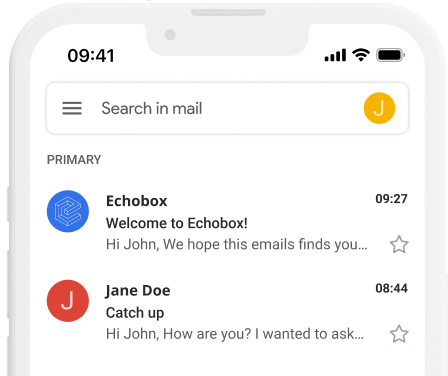
How does BIMI work?
BIMI works very similarly to other sender verification methods such as DMARC and DKIM. It is a text record that you store on your domain’s server. When your message is delivered, the recipient’s email service looks for your BIMI text file, verifies it, and places it in the recipient’s inbox.
How to implement BIMI
-
Check your DMARC policy
In order for a BIMI logo to display, your DMARC policy (which you can find in your domain’s DNS records) needs to be set to either p=quarantine or p=reject. We recommend p=reject for maximum security.

-
Create your BIMI logo
Your logo file must be a squared SVG image without any text. It is also recommended to be in the Tiny 1.2 format. Since different inboxes will change the way that your logo is displayed, you should make sure it looks acceptable when cropped in different ways.
See here for more thorough guidance.
Below is an example SVG image.

-
Publish your BIMI record
Your BIMI TXT record should look something like this:
default._bimi TXT "v=BIMI1; l=https://cdn.mydomain.com/bimilogo.svg ;

This should be inserted into your DNS record.
If you have a Verified Mark Certificate (or VMC), that confirms your ownership of a BIMI logo, it should also be included, and will look similar to this: https://www.example.com/path/to/vmc/VMC.pem .
-
Check that your BIMI is working
There are several online tools that can check if your BIMI is set up correctly. Here are a few examples: